Transaction States
Every payment in Ottu moves through a series of states, from creation to completion. Understanding these states helps you maintain an accurate audit trail, manage operations efficiently, and know exactly where each payment stands.
For the full technical state machine, see Payment States.
Payment Object Model
Every payment in Ottu is described by four core objects. Knowing what each one is — and how they relate — makes the state tables below much easier to follow.
- Payment Transaction — the parent record holding the customer's intent to pay (amount, currency, allowed gateways, lifecycle state).
- Payment Attempt — a single gateway-level try against a
Payment Transaction. One transaction can have many attempts; at most one reaches apaidstate. - Payment Request — a
Payment Transactionwithtype: payment_request, merchant-initiated and typically delivered as a payment link. - E-commerce Payment — a
Payment Transactionwithtype: e_commerce, customer-initiated from an external storefront (Shopify, WooCommerce, Magento, etc.).
Hierarchy
A Payment Transaction is the parent record. Every gateway-level try against it is a Payment Attempt child:
The type field on Payment Transaction tells you what kind of intent it represents — a Payment Request, an E-commerce Payment, or one of several other types:
The "Parent Transaction" and "Child Transaction" terms used in the rest of this page refer to a separate concept: a child transaction is a record Ottu creates when a post-payment operation (capture, refund, void) is performed on the original payment. They are not the same as PaymentAttempts above — PaymentAttempts are the customer's individual tries on a single payment, while child transactions track later operations on a completed payment.
Transactions in Ottu fall into two categories:
- Parent Transaction -- Stores all the essential data about the payment. This is the primary record of the transaction.
- Child Transaction -- Created when a subsequent operation is performed on a parent transaction, such as a capture, refund, or void.
Parent States
The parent state reflects the overall status of the original payment transaction.
| State | Description | Actor |
|---|---|---|
| Created | The payment has been initiated successfully. | Merchant |
| Pending | The customer has interacted with the payment (viewed the checkout page, accessed the link, etc.) but has not completed it yet. | Customer |
| Attempted | The payment failed on the customer's end and is waiting for a retry. It stays in this state until successfully processed, expired, or canceled. | Customer |
| Authorized | The customer entered card details, and the bank has allocated (held) the amount, but it has not been deducted yet. | Customer |
| Paid | The bank has successfully deducted the payment amount. | Customer |
| Failed | The transaction encountered an error and could not be completed. Only applies to transactions that allow a single attempt. | Customer |
| Canceled | The merchant canceled the payment. No further action can be taken. | Merchant |
| Expired | The payment link's lifespan has ended. | Customer |
| Invalid | The payment is no longer available due to changes in payment configuration, currency exchange settings, or other unforeseen events. | Merchant |
| COD | Cash on Delivery -- the customer chose to pay in cash. | Customer |
The Pending state is only available when using an Ottu plugin with the checkout page. The Attempted state does not exist for single-attempt transactions; those go directly to Failed or Authorized.
Child Payment States
Child transactions are created when a merchant performs an operation (capture, refund, void) on a parent transaction. The table below shows each child state, its originating parent state, and what it means.
| Child State | Parent State | Description |
|---|---|---|
| Paid | Authorized | A portion or all of the authorized amount has been captured. A child transaction record is created to track the capture. |
| Refunded | Authorized / Paid | A partial or full refund has been returned to the customer (to the original gateway or to the customer's wallet). |
| Refund-queued | Authorized / Paid | The refund is awaiting bank approval. |
| Refund-rejected | Authorized / Paid | The bank did not approve the refund. |
| Voided | Authorized | The authorized amount has been reversed. The full amount (including any fee) is returned to the customer. |
Voiding can only be performed on authorized transactions that have not been captured. Once a capture occurs (even a partial one), the void option is no longer available -- use a refund instead.
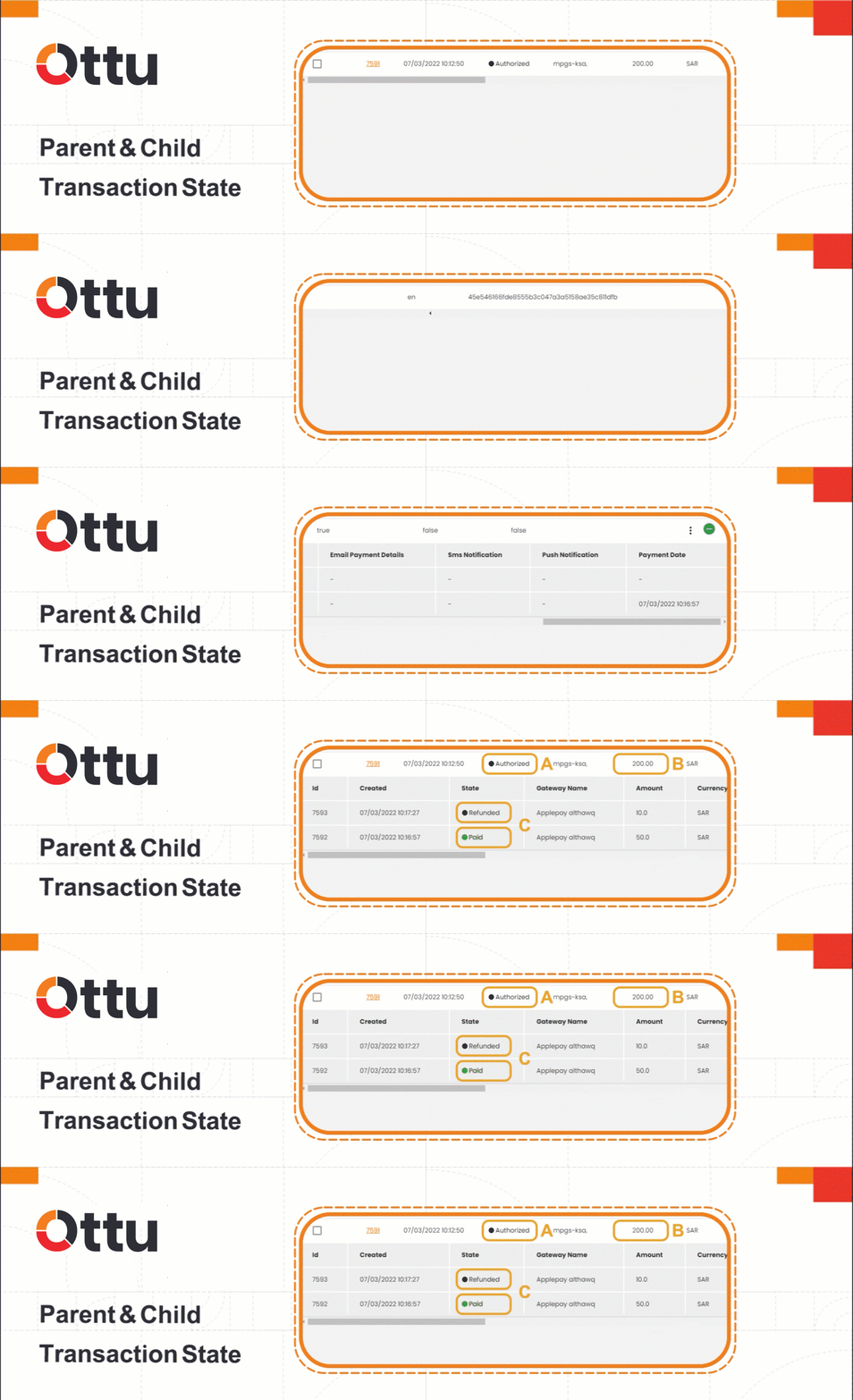
The figure below illustrates a payment transaction with both parent and child states. The parent transaction is in the Authorized state, and the child transactions show Paid (captured) and Refunded states for the same payment.
Payment Attempts
A payment attempt represents a customer's individual try at completing a payment. When a transaction fails, the customer can retry -- potentially multiple times -- until the payment succeeds, expires, or is canceled.
Attempt States
Each attempt has its own state, separate from the parent transaction state:
| Attempt State | Description |
|---|---|
| Pending | The customer has viewed the transaction details. |
| Failed | Payment failed (insufficient funds, card declined, etc.). The number of allowed attempts depends on the payment configuration. |
| Canceled | The customer clicked the cancel button. |
| Success | The payment attempt was successful. |
| Error | A payment gateway error occurred (service unavailable, network issue, etc.). |
| COD | Cash on Delivery was selected. |
When COD is used, a payment attempt is still created. Every change in the final state of a payment transaction must be associated with a payment attempt.
State Combinations
Understanding how parent transaction states and attempt states interact is key:
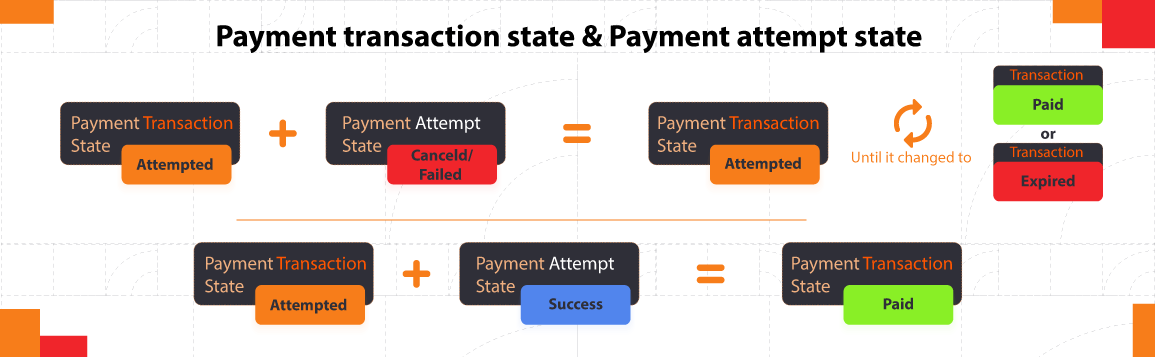
For transactions that allow multiple attempts:
- If the attempt state is
canceledorfailed, the parent transaction remains in theattemptedstate. The customer can try again until the transaction either expires or succeeds. - If the attempt state is
success, the parent transaction moves topaidorauthorized.
For transactions that allow only a single attempt:
- There is no
attemptedstate. The transaction goes directly to eitherfailedorauthorized.
What's Next?
- Transaction Insights -- Review amounts, fees, and dashboard charts
- Operations -- Perform captures, refunds, and voids
- Notifications & Timing -- Configure when notifications are sent for each state change
- Search & Filter Payments -- Find transactions by state, user, or gateway