Advance Payment
Ottu provides a seamless workflow for merchants to process advance payments. To initiate an advance payment, follow the steps described in Triggering Contract Actions.
Selecting Invoices
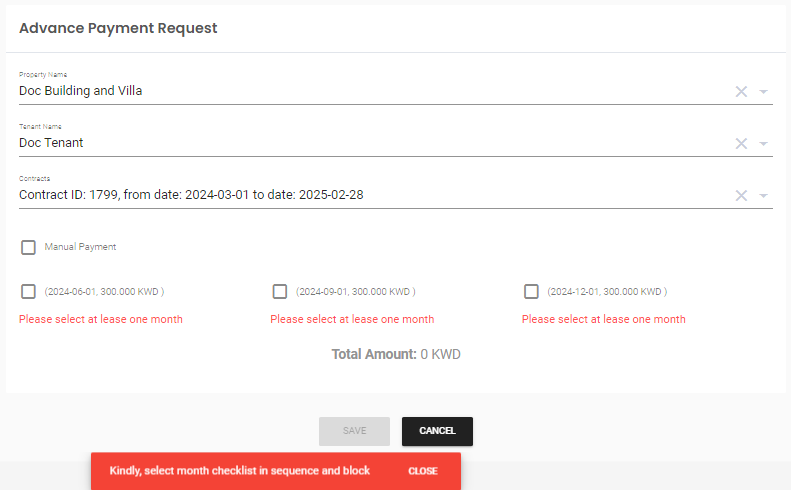
To generate the advance payment request, select the invoices that should be paid in advance.
Sending the Advance Payment Request
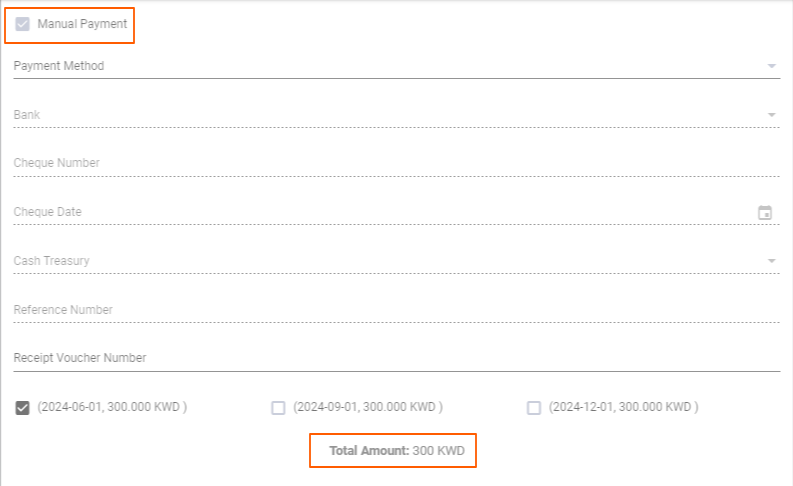
After selecting the required invoices, there are two options:
- Send payment link to tenant -- If the merchant saves without checking the Manual Payment option, an email is automatically sent to the tenant requesting them to pay for the advance payment online.
- Record as manual payment -- If the merchant checks the Manual Payment box, the advance payment is processed using the same flow as Manual Payment.
What's Next?
- Manual Payment -- Record offline payments
- Contract Management -- Overview of all contract actions
- Invoices Management -- View and manage all invoices
- Auditing -- Roll back an advance payment if needed