Contract Management
The Ottu Real Estate Plugin enables merchants to efficiently manage property rental agreements. It offers tools to create, renew, modify, and terminate contracts while tracking key details such as status, dates, and payments. This ensures seamless management and clear oversight of all contractual obligations.
Contract Lifecycle
A contract in the Real Estate Plugin goes through several stages:
- Creation -- A new contract is created linking a tenant to a property unit with defined terms.
- Active -- The contract is in force; invoices are generated and payments collected.
- Renewal -- An active contract can be renewed with updated terms and a new end date.
- Suspension -- A contract can be suspended, halting all invoice payments.
- Resumption -- A suspended contract can be resumed, reactivating payments.
- Termination -- A contract can be terminated when the tenancy ends.
Triggering Contract Actions
Merchants can perform contract actions from the Tenant & Contract Dashboard:
- Go to the Tenant and Contract Management section.
- Search for the tenant and property associated with the contract you want to manage.
- At the end of the contract's row, click on the three dots (...).
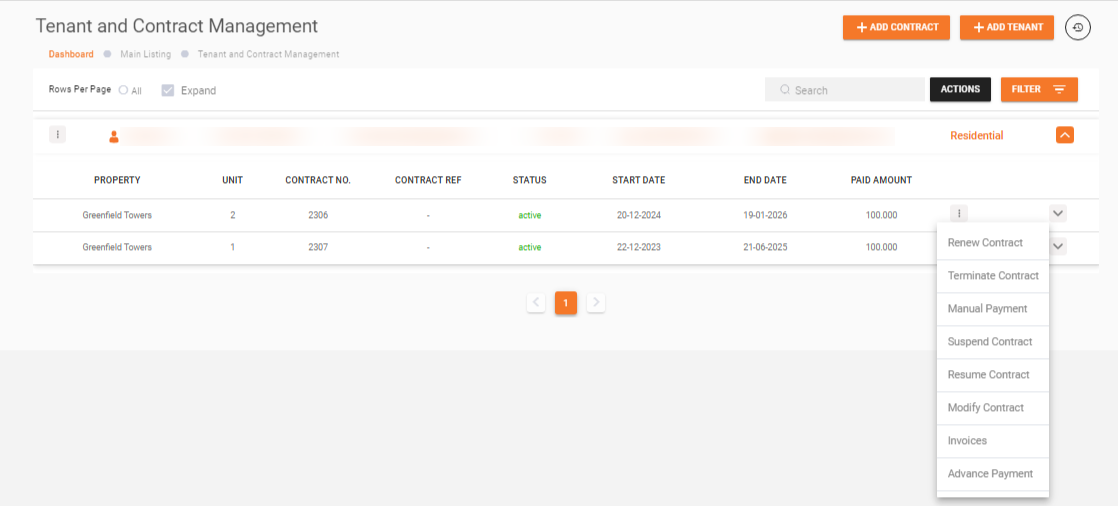
The following actions are available:
| Action | Description |
|---|---|
| Renew Contract | Extend an existing contract with a new end date and optionally updated amounts |
| Terminate Contract | End a contract by specifying termination and leave dates |
| Suspend Contract | Temporarily block all invoice payments for a contract |
| Resume Contract | Reactivate a previously suspended contract |
| Manual Payment | Record an offline payment against a contract's invoices |
| Advance Payment | Request and process advance rent payments from a tenant |
What's Next?
- Add Contract -- Create a new rental agreement
- Generate Invoice -- Create and send invoices for contracts
- Auditing -- Track contract changes and roll back operations