Tenant & Contract Dashboard
The Tenant & Contract Dashboard provides a centralized view of all tenants and their associated contracts. It offers both expanded and collapsed views, quick access to key details, and actions for managing tenants and contracts.
Default View (Expanded)
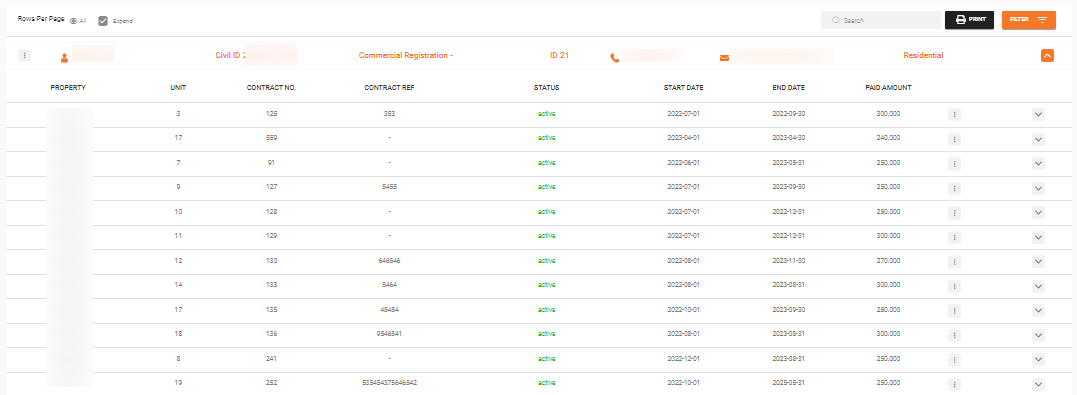
In the default expanded view, all tenants are listed with their associated contracts visible beneath each tenant.
Example:
Tenant 1
  - Contract 1
  - Contract 2
  - Contract 3
Tenant 2
  - Contract 1
  - Contract 2
  - Contract 3
Collapsed View (Unexpanded)
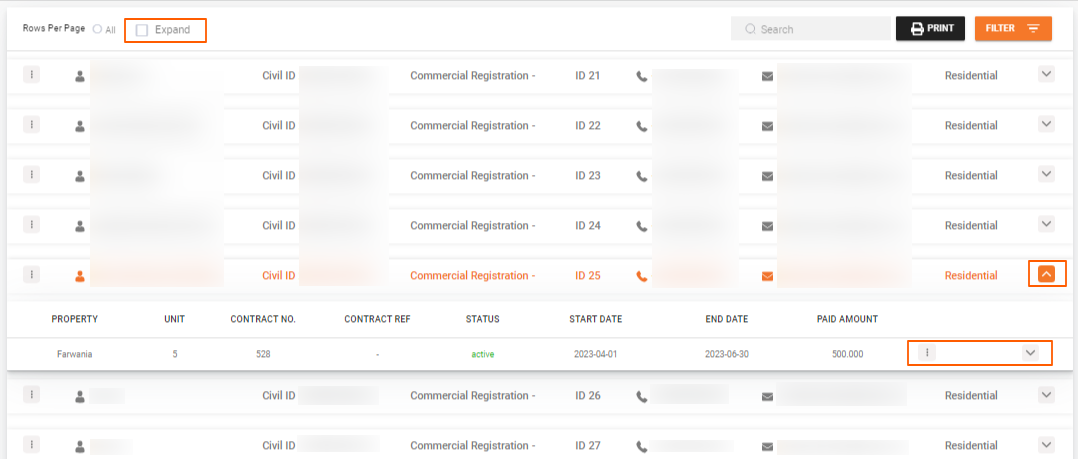
Uncheck the Expand box to view a list of tenants without their contracts.
Before expanding:
Tenant 1
Tenant 2
Tenant 3
After expanding a specific tenant (click the dropdown arrow next to a tenant's name):
Tenant 1
  - Contract 1
  - Contract 2
  - Contract 3
Tenant 2
Tenant 3
Information Displayed
Tenant's Row
Each tenant row displays:
- Tenant's name
- Civil ID
- Phone number
- Other relevant details
Contract's Row
Each contract row displays:
- Property name
- Number of units associated
- Contract number and reference
- Contract status (active or inactive)
- Start and end dates
- Payment amount
Click the dropdown arrow at the end of a contract's row to access more information about that contract.

Available Actions
Tenant Actions
Click the three dots (...) at the beginning of each tenant row to:
- Edit tenant information -- Update the tenant's profile details
- Create a new contract -- Start a new rental agreement for this tenant
Contract Actions
Click the three dots (...) at the end of each contract row to access contract actions such as:
What's Next?
- Tenant Management -- Add and edit tenant profiles
- Contract Management -- Overview of contract lifecycle and actions
- Add Contract -- Create a new rental agreement