Invoice API
Ottu's Invoice API automates invoice generation for both online and walk-in customers. You create an invoice with line items, taxes, and discounts — Ottu generates a payment link (checkout_url) that customers can use to view the invoice, download it as PDF, and pay directly. The API integrates with the Checkout API under the hood, so invoices benefit from the same payment gateway support, webhooks, and transaction tracking.
Ottu offers SDKs and tools to speed up your integration. See Getting Started for all available options.
When to Use
- Issuing invoices with payment links — create an invoice and send the
checkout_urlto customers via email, SMS, or WhatsApp. - E-commerce order billing — generate itemized invoices with taxes, discounts, and shipping for online purchases.
- Walk-in customer billing — create invoices for in-person transactions at brick-and-mortar establishments.
- Tax-compliant invoicing — leverage VAL CALC fields to ensure frontend calculations match Ottu's backend precisely.
Setup
-
Payment Gateway — a Purchase Payment Gateway must be configured. The Invoice API does not support the Authorize type.
-
Optional:
roundfunction — when building a frontend for invoice creation, implement the same rounding logic Ottu uses (ROUND_HALF_UPper Python decimal) to avoid discrepancy errors. Decimal places follow ISO 4217 currency standards. -
Optional: Payment Methods API — call it to discover available
pg_codesdynamically. If you already know yourpg_code, you can skip this step.
Guide
Workflow
- Merchant creates an invoice via the Invoice API with line items, taxes, discounts, and shipping.
- Ottu returns a
checkout_urlandinvoice_pdf_url— the payment link and downloadable PDF. - Merchant sends the link to the customer via email, SMS, WhatsApp, or their own channels.
- Customer views the invoice on Ottu's Checkout Page, downloads the PDF, and makes payment.
- Ottu sends a webhook to the merchant's
webhook_urlwith the transaction result.
Invoice Structure
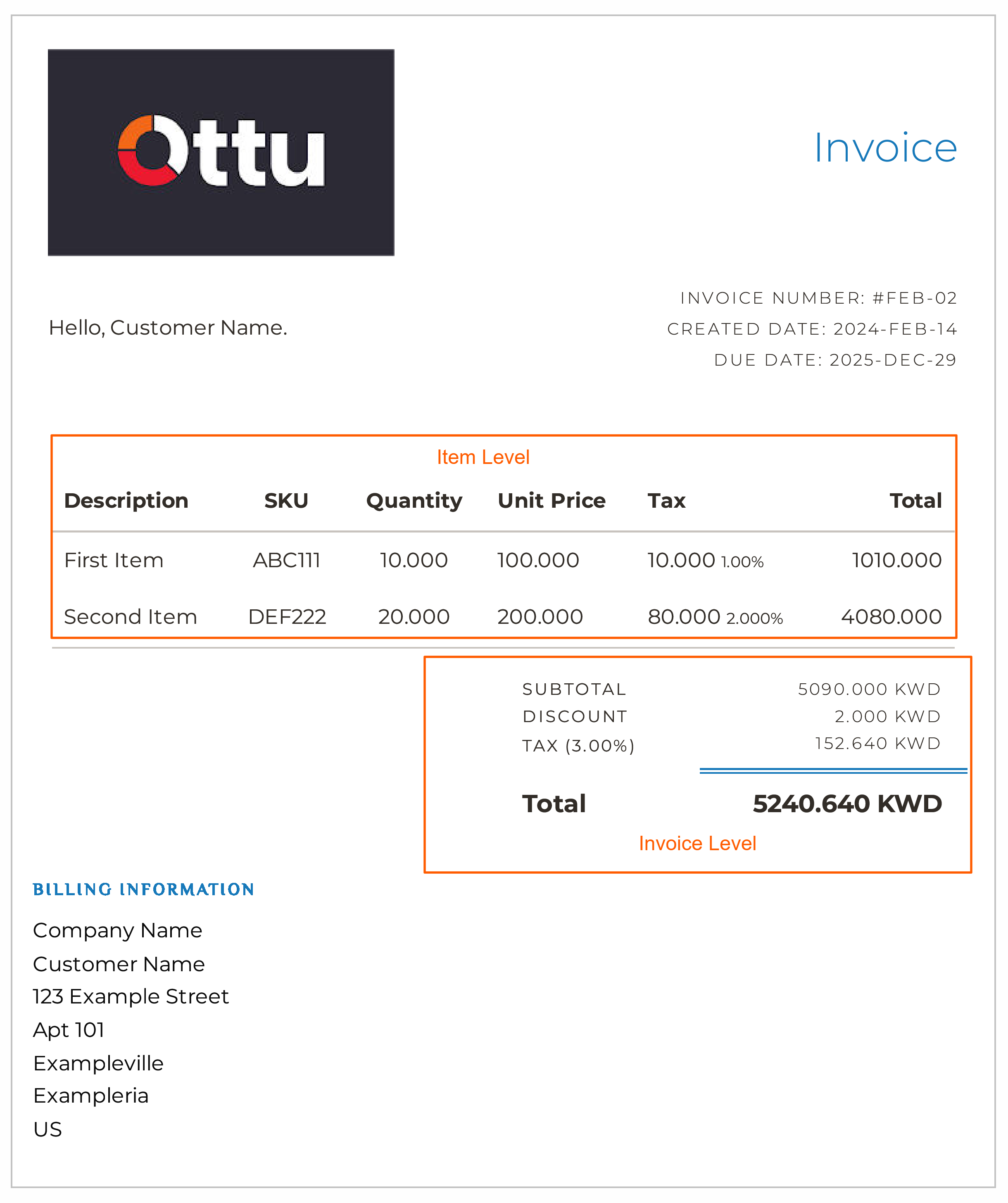
Invoices have two levels of detail:
Item level (inside invoice_items):
- Mandatory:
sku,description,quantity,unit_price - Optional:
tax_rate,discount_amount,discount_percentage - VAL CALC:
total_excl_tax,total_incl_tax,tax_amount
Invoice level:
- Mandatory:
type,currency_code,pg_codes,invoice_number,due_date - Optional:
tax_rate,discount_amount,discount_percentage,shipping_excl_tax,shipping_method,shipping_tax_rate - VAL CALC:
total_excl_tax,total_incl_tax,tax_amount,shipping_incl_tax,subtotal,amount
VAL CALC fields are optional validators. If provided, Ottu checks them against its own calculations and rejects the request if they don't match — preventing frontend/backend discrepancies.
- Exclude optional fields entirely if not relevant — don't send
nullor0. - Rate/percentage fields are limited to 2 decimal places. Monetary fields follow ISO 4217.
- Invoices are immutable — the API does not support
PATCH. Create a new invoice for any updates.
Step-by-Step
1. Retrieve pg_codes (optional)
Call the Payment Methods API to get available gateway codes, or use a known pg_code directly.
2. Create the invoice
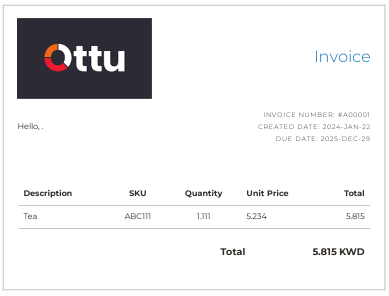
{
  "type": "e_commerce",
  "due_date": "2025-12-29",
  "currency_code": "KWD",
  "pg_codes": ["credit-card"],
  "invoice_number": "A00001",
  "invoice_items": [
    {
      "sku": "ABC111",
      "description": "Test",
      "quantity": 1.111,
      "unit_price": 5.234
    }
  ]
}
Response (key fields):
{
  "amount": 5.815,
  "checkout_url": "https://sandbox.ottu.net/b/checkout/redirect/start/?session_id=...",
  "session_id": "9ba4c834f55f1e5476b9d9ea47ec7b12f61f9511",
  "invoice_pdf_url": "https://e.pay.kn/HWiDBBAQ8WBn",
  "state": "created",
  "invoice_items": [
    {
      "sku": "ABC111",
      "description": "Test",
      "quantity": 1.111,
      "unit_price": 5.234,
      "total_excl_tax": 5.815,
      "tax_amount": 0.0,
      "total_incl_tax": 5.815
    }
  ]
}
3. Send the payment link
Share the checkout_url with the customer. They can view the invoice, download the PDF, and pay.
4. Handle the webhook
Ottu posts the transaction result to your webhook_url. Use the session_id to match the response to the original invoice.
Use Cases
Invoice with item-level discount
Apply a discount_percentage at the item level:
{
  "type": "e_commerce",
  "due_date": "2025-12-29",
  "currency_code": "KWD",
  "pg_codes": ["credit-card"],
  "invoice_number": "A00002",
  "invoice_items": [
    {
      "sku": "ABC111",
      "description": "Test",
      "quantity": 1.111,
      "unit_price": 5.234,
      "discount_percentage": 12
    }
  ]
}
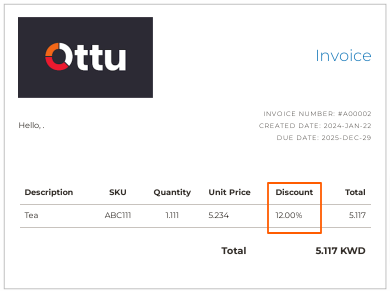
You cannot provide both discount_percentage and discount_amount on the same item or invoice — the API will reject the request.
API Reference
Create a new Invoice
Best Practices
Immutable Invoices
Invoices cannot be modified after creation. If an error is made, create a new invoice with the correct details.
Authentication
Use Private API Key or Basic Authentication. Rotate API keys regularly.
VAL CALC Fields
Include VAL CALC fields (total_excl_tax, tax_amount, total_incl_tax, subtotal, amount) in your requests to catch frontend/backend calculation discrepancies before they reach the customer.
Invoice Generation Logic
The invoice calculation uses ROUND_HALF_UP at both item and invoice levels:
Item level:
quantity_price= round(quantity×unit_price)- Apply discount:
total_discount= round(quantity_price×discount_percentage/ 100) ordiscount_amount total_excl_tax= round(quantity_price-total_discount)tax_amount= round(total_excl_tax×tax_rate/ 100)total_incl_tax= round(total_excl_tax+tax_amount)
Invoice level:
subtotal= round(sum of allitem.total_incl_tax)- Apply invoice-level discount (same logic as item level)
total_excl_tax= round(subtotal-total_discount)tax_amount= round(total_excl_tax×tax_rate/ 100)shipping_incl_tax= round(shipping_excl_tax+ round(shipping_excl_tax×shipping_tax_rate/ 100))total_incl_tax= round(total_excl_tax+tax_amount+shipping_incl_tax)amount=total_incl_tax
FAQ
What's Next?
- Checkout API — The underlying API that Invoice API builds upon
- Webhooks — Receive payment status notifications for invoices
- Operations — Refund, capture, or void invoice payments